Hey everyone, after taking a much needed break, I’m back to work on the game!
The next major task to tackle is “logic” (switches, sensors, control modules, etc.) which will involve some experimentation and iteration to figure out how it should all work. This will take a little while, so in the meantime here’s a small update with a selection of new parts and other improvements.
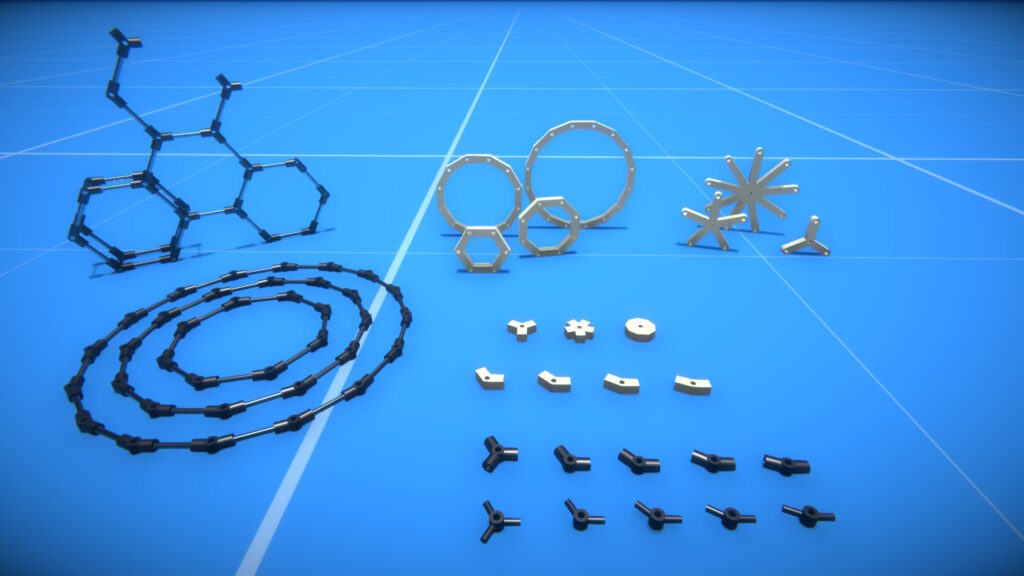
Angle limiters
These parts connect to an axle via a rotary bearing, and restrict rotation between a minimum and maximum angle that you can specify.
Ratchets
These also connect to an axle via a rotary bearing, and allow for rotation in only one direction. You can configure the number of ratchet locking “steps”, set the locking direction, and optionally bind a key to temporarily release the ratchet lock.
There are also gears of various sizes with the ratchet mechanism built in.
Other parts
Speaking of gears, I’ve added a couple more spur gear size variations, and worm gears with the opposite thread direction. You’ll also find some new blocks and connectors…
…including a universal joint “yoke” that can be combined with the “Angle Axle 4 x 90” connector to build universal joints.
There a few more improvements too, check out the full release notes for details:-
New parts:-
Block, resizable in all three axes (and hollow, like the sphere and cylinder).
U-Plate block.
Offset tile 1×2 and 2×2 blocks.
Spur gears 28T and 36T.
Worm gears x1, x3, and x7 with opposite thread direction.
Ratchets (axle-to-axle & block-to-axle).
Ratchet gears x1 to x3.
Angle limiters (axle-to-axle & block-to-axle).
Small corner 90 and tee 90 pipes.
“2-Hole & Axle (Perp)” and “2-Plate & Axle” connectors.
Universal joint “yoke” connector.
Stepper motors now have optional angle limits.
Added colliders to gear and pulley “hubs”.
Added option to simulation settings to disable physics force range limit.
Added option to builder tool “advanced options” to adjust part highlighting brightness.
Added option to ConstructionDebug script mod for showing part colliders.
Added option to game settings to disable cloud diagnostics crash and exception reporting.
Hey all, here’s a small update with a few improvements and some new parts.
Angled beams and connectors
In the previous update I introduced the “V” and “W” angled beams, primarily to allow for building V configuration engines. If you’ve been using these parts, you may have noticed some bugs with the building system (e.g. sometimes your construction might freeze at a weird angle).
I’ll come back and address these problems in the future, but seeing as those angled parts are now out in the wild, I figured I might as well release the others I’ve made. So you’ll now find more angled beams, and connectors too!
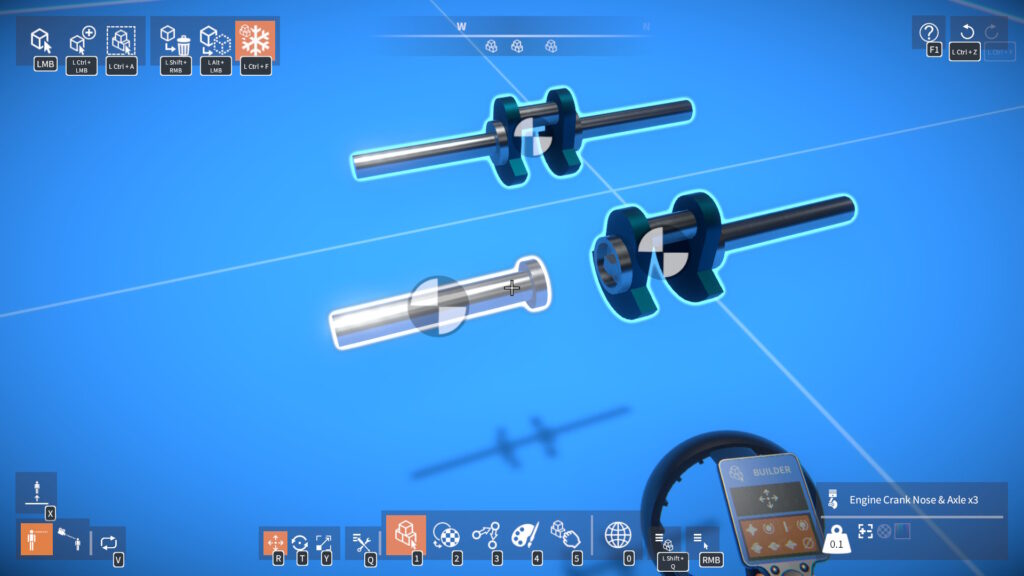
Engine crank nose
I’ve added a “crank nose” part, which can attach to the existing crank parts. This is particularly useful if you want axles coming out of both ends of a single driven crank.
This makes the “front crank” parts kind of redundant actually, but I’ll have to keep them so as to not break existing builds.
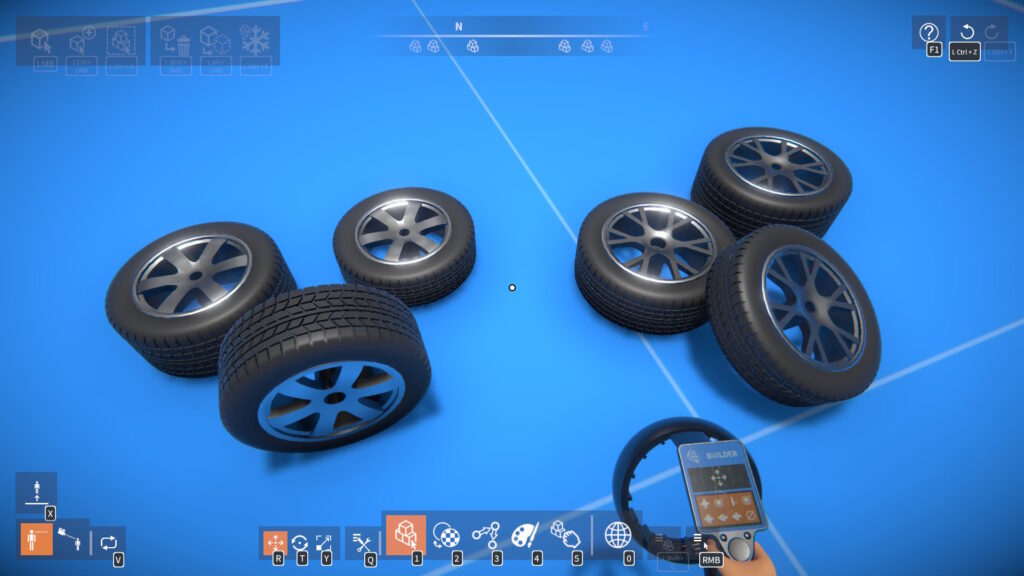
More wheels
We also have some more wheels thanks to community member Alex!
There are one or two other tweaks and improvements too, here are the full release notes:-
New parts:-
Engine “crank nose” with resizable axle.
Angled connectors.
Angled beams.
Car wheels designed by Alex (6.5 and 7 units diameter, various widths).
Added “double audio pitch” toggle to engine head part behaviour settings.
Added separate volume slider in audio settings for environment sounds.
Added “Ctrl + F” freeze / unfreeze shortcut to material, painter, and grabber tools.
Lua scripting changes and new features:-
New “button image” UI element (use IElementFactory.CreateImageButton() to create from Lua).
Added IsTargetable property to IElement (disable to prevent a UI element from blocking the mouse pointer).
Added GetDims() method to IBoundary.
In PlayerHUD script mod, pressing Tab now toggles between metric and imperial units.
Hello everyone, it’s been a long time coming, but it’s finally time for another update!
There’s too much to cover in technical detail here really, so I’ll just give a brief summary…
Combustion Engines
As I mentioned in my last post, I tried using physics forces applied to physical piston and con-rod parts to drive the engine. After prototyping this, I found it not be a viable solution, due to phantom forces (from rapidly moving piston and con-rod parts), performance cost, and other issues.
Mean Value Modelling
I looked into other possible methods for simulating internal combustion engine. The basic requirements being: a model that takes current engine RPM and throttle amount as inputs, and calculates output torque. Ideally it should be parameterised to allow for tweakable engine characteristics (giving different torque curves etc.)
Some possibilities included (in order of complexity): lookup tables, mean value modelling (MVM), 1D or multi-D fluid dynamic modelling. After investigation, I chose a basic MVM approach for relative simplicity (for performance and implementation), while still providing more flexibility and realism than a simple lookup table based solution.
This required implementing code for:-
Gas (air) physics – flow rate calculation (choked flow), pressure state equation, etc.
Engine physics – calculations for: throttle air flow rate, fuel flow rate, volumetric efficiency, thermal efficiency, indicated torque, friction loss torque, and pumping loss torque.
A “sim updater” to update the simulation multiple times per fixed update (giving a smaller time step per update). I found this was necessary to improve simulation stability of the throttle air flow and intake manifold pressure.
Part behaviours for the engine crank, head, throttle, etc. to calculate their various parts of the simulation.
Parts
I’ve made a selection of new parts (cranks, cylinders, heads, throttle, etc.) that you can use to build combustion engines.
There are three crank parts (rear, middle, front) that can be assembled together to make a crankshaft. An engine must at least have a rear crank part, as it is the “driven crank” – i.e. it has the part behaviour that actually calculates and applies torque to the crankshaft.
The piston and con-rod are not separate parts in of themselves, but are shown automatically when a cylinder and crank are linked together. They have no associated physics rigidbodies, they’re just animated based on the crank angle relative to the cylinder.
You can make pretty much any engine configuration you like!
Sound
I wanted the engine sound to be derived from and recognisable to any given engine configuration. For simplicity, the approach I went with is to play a looped “single cylinder” sound for each of an engine’s cylinders, with pitch and volume varied based on RPM and engine load. The audio playback is then synchronised across all the cylinders, with a precise timing offset for each cylinder.
I developed a method for determining timing angle from firing order and crank angle, and then used this to calculate the offset for audio synchronisation. I found the ear is very sensitive to small changes in audio timing, but when the playback is synchronised with the correct offsets, out pops the characteristic sound of a V6, V8, V10, and so on!
The resulting sounds aren’t perfect by any means. For example, the sound sample I used could be better, and there are phasing issues with certain engine configurations which can cause the overall sound to be a bit “weak” in lower frequencies. However, I’m generally quite happy with the results, given the low implementation and performance costs.
Lua Script Mods
To assist the player when building and tweaking combustion engines, I figured some additional tools would be useful. These were implemented as Lua script mods.
The EngineTool shows an engine’s firing order, provides a choice of predefined firing orders, and allows firing order to be individually adjusted per cylinder head.
The PartBehaviourGraph script mod displays real-time graphs of part behaviour data channels. It will work with any part behaviour, but will be especially useful for monitoring combustion engine torque, power, etc.
More Parts and Materials
There are a bunch of other parts in the game too, torsion springs, pipes, more gear & pulley sizes, new wheels, and more.
Linear actuators now have new “stepper” and “auto centre” operating modes, configurable in the part behaviour menu.
The materials have tweaked density & strength values, and there are new material types such as lead, teflon, and rubber.
Example Constructions
There are some new examples in the kit building scenario you can try out, to get a feel for putting engines together.
Okay that’s it for this update, I hope you enjoy it!
Full release notes:-
New parts for building combustion engines:-
Cranks.
Cylinders.
Heads.
Throttle.
Starter motor.
Alternator (generator).
Fuel tanks.
Fans.
Added new engine and fuel link types (for use when building engines).
Other new parts:-
Racing wheels 4×8 and 5×8.
Torsion springs (axle-to-axle & block-to-axle).
Centrifugal clutch ring gear x3.
Spur gears 10T, 14T, 18T and 22T.
Pulleys x1.5 and x2.5.
Pipe sections.
“V” and “W” angled blocks.
Gusset x1.
Racing helmet for characters.
Materials:-
Density and strength values tweaked to try and better match real world values.
New materials added: glass, glass fibre, lead, rubber, teflon, and tungsten.
Linear actuators now have tweakable min / max extension and new “auto centre” and “stepper” modes.
New constructions added to the kit building scenario:-
Go-kart (1 Cylinder).
Sports Car (4 Cylinder).
V12 Formula Racer.
Flat 6 Endurance Racer.
Lua scripting changes and new features:-
Added methods to IDataSource interface to get a part behaviour’s individual data channels (old methods for getting data now deprecated).
Each data channel can now be a different type (float or boolean), and is accessible via a new IDataChannel interface.
New “shapes” UI element (use IElementFactory.CreateShapes() to create from Lua) for adding custom quads, primitives, and lines within a UI canvas.
New “time series graph” UI element (use IElementFactory.CreateTimeSeriesGraph() to create from Lua).
New “text objects” – UI text that can be located in 3D space, created in Lua via the TextObjects global (see ITextObjects interface).
Added support for resizable UI windows (see IsResizable and other new properties in IWindow interface).
Added support for rotating UI elements (see IRotatable interface).
Added Vector2 type.
New script mods:-
UIShapesTest – Demonstrates UI shapes.
TimeSeriesGraphTest – Demonstrates UI time series graphs.
PartBehaviourGraph – Displays real-time graphs of part behaviour data channels (such as torque, power, etc.)
EngineTool – Shows an engine’s firing order, provides choice of predefined firing order, or for individual adjustment per cylinder head.
MiniMap – Displays a map showing construction locations in the scene.
Improved debug console (window background, command history length).
By this point, I was hoping to have combustion engines done. I tried a purely physics based approach, using separate cylinder, piston, con-rod, & crank rigidbodies, and applying a force to the piston based on the current angle of the crank. This worked reasonably well, but had problems with “phantom forces” whereby the engine got torque applied to it, sometimes flipping over the vehicle it’s in. Also, using physics for all the parts like this has RPM limitations, and doesn’t scale that well for sim performance.
So I’ve decided to change tack slightly, I still want to keep the appearance of the moving parts (i.e. pistons and con-rods), but my plan is now to procedurally animate these in code. There’s not really any need to use physics as these parts can’t collide with anything when inside an engine. To apply torque to the crankshaft, I’m working on something similar to the electric motors, but with a different torque curve.
Hopefully I’ll be able to get this done soon, but in the meantime I thought it would be good to get a small update out. Here’s what’s in it…
Parts
There are now some slider versions of the 1-Hole and 2-Hole connectors, some new “angle axle” connectors, and a larger centrifugal clutch.
Also, the rounded beams can now be resized one unit smaller than before.
Part Behaviours
I’ve improved how the invert option works for parts with a single key bind (e.g. brakes), adding a separate invert option for the joystick axis.
You can now type in values for any part behaviour slider, by right clicking it. Even values beyond the normal slider range can be entered (but no guarantees the physics won’t blow up with higher RPMs or torques!)
No Collide Tool
For those who want to bypass part collisions in their builds, I’ve added a new “PartCollision” script mod tool that can be used to disable part collisions. Parts with their collision disabled will still collide with the ground, but nothing else.
Here are the full release notes:-
New parts:-
“1-Hole Slider” and “2-Hole Slider” connectors.
Angle axle 90, 180, 3 x 90, & 4 x 90 connectors.
Centrifugal clutch x3.
Rounded and half rounded beams can now be resized one unit shorter.
Added “invert axis” option to part behaviour joystick axis settings.
In brake, clutch, and differential part behaviours, replaced “invert direction” option with “invert control”, which properly inverts their control behaviour.
By right clicking a slider in the part behaviour settings, it’s value can now be edited by typing in a number.
Shortcuts (Ctrl+C and Ctrl+V) for copy and paste in part behaviour settings.
A construction can now be unfrozen (via the construction UI) while the player is seated in it.
Lowered minimum mouse sensitivity values.
Added methods to IConstructionOperations to set whether parts are collidable (and added IsCollidable property to IPart interface).
I’ve just released another update, with a bunch of new parts!
Clutches
These attach two axles together, one with a fixed attachment, the other with a rotary bearing. The clutch can be engaged / disengaged with a key press, which will smoothly lock / unlock the rotary bearing.
Clutch Gears
These are a type of spur gear that attach to an axle with a rotary bearing only. Similar to regular clutches, they can be engaged / disengaged from the axle they’re attached to.
Brakes
Wheels already have built in brakes that you can optionally enable, but these separate brake parts allow you to brake an axle without needing to use a wheel. The brakes attach to an axle with a rotary bearing, and to the part you want to brake against (e.g. a beam) with a fixed attachment.
Angle Sensor
You can attach an axle to this sensor, and link a display to it. It’ll show the axle’s current relative angle, RPM, etc.
There are a few other tweaks and improvements too, here are the release notes:-
New parts:-
Angle sensor.
Clutches x3 and x4.
Clutch gears x1 to x3.
32T and 48T Hi & Lo bevel gears.
Disk brakes x3 and x4.
Added brake calipers to wheel brakes.
Added setting to speed / altitude sensor to use imperial units.
Parts and materials are now listed in order in UI.
But first I just wanted to say a big thanks to all of you for playing the game and sharing your creations. It’s great to see so many new players joining the community, it really helps motivate me to keep trying to make the game better!
OK, on to the update.
Soap Box Challenge
See how fast you can get down the hill under gravity alone, no motors allowed. This new scenario gives you an idea of the kind of “mini games” possible with Lua scripting, but it still barely scratches the surface really, hopefully we can push the boundaries of this more in the future. Anyway, check it out and let me know what you think.
New Parts
Continuous servo motors, more crown, rack, & worm gear sizes, more “hole & plate” connectors, and round ended beams.
Part Behaviours
Separate servo forward & reverse angles, flip pulley belts, link displays to multiple parts, etc.
Here’s a quick look at some of these changes:
Release notes:-
New Soap Box Challenge scenario.
New parts:-
Small and medium continuous servo motors.
24T and 40T Hi & Lo crown gears.
x3 rack gear.
x1 worm gear.
More “1-Hole Plate” and “2-Hole Plate” resizable connectors.
Rounded and half rounded resizable beams.
Part behaviour improvements:-
Servo motor part behaviour now has separately tweakable forward and reverse angles.
Servo and stepper motor part behaviours now have an “angular speed” data channel.
Pulley part behaviour now has an option to flip belt routing.
Displays can now be linked to multiple other parts.
Motor, battery, and rotor parts can now attach to each other, and to other parts in a more consistent way.
Changed plate on “plate axle” connector part to be circular.
Tweaked material strength of all wheels.
Added buttons to UI screens to open containing folder in Windows Explorer.
Added player “free flight movement mode” setting to allow for moving horizontally rather than along the view direction.
Added settings to the controls options screen for disabling each of the manipulators.
Improved crosshair.
Added Hungarian translations to currently localised strings, thanks to BlueGoldFlag.
New in the game – “attachment bridging”, a slightly easier way to do “node skipping”, with the added benefit that the attachment indicator now shows where the bridged attachments are:
Release notes:-
Implemented “attachment bridging” feature and added option to BuilderToolExt script mod to enable it.
Added option to the selection GUI to disable selection of locked neighbouring parts.
Enabled rotary, linear, and linear rotary attachment types for pulleys.
Enabled rotary bearing attachments for angled connector parts.
Enabled rotary bearing attachment on steering arm part.
Added resizable “scaffold” axle part.
Removed TweakEnergyStore variable, tweaking of battery charge remaining now automatically prevented when energy consumption is enabled.
Added LimitedPartBehaviourTweaking variable, enabling it limits part behaviour tweaking to player input (e.g. key binds) only.
Added setting to video options that allows for the selection of exclusive or borderless full-screen, or windowed screen mode.
Added setting to game options to turn off “Start Here!” help message.
Added error message popup shown when attempting to unfreeze an intersecting construction.
Updating localised strings with Russian translations thanks to Ludanton!