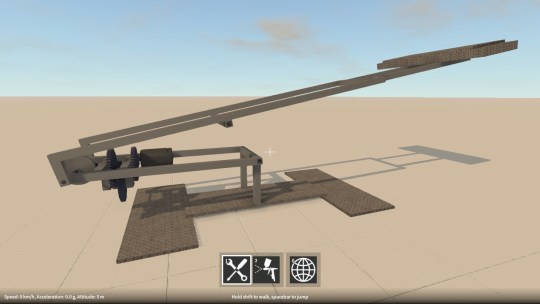
Wheel physics revisited

Last week I decided to take another look at the wheel physics implementation, in particular the tire friction model.  First let’s quickly recap how the wheel physics works in GearBlocks.

Wheel physics recap

Every update I find the contact point on the ground directly below the wheel and position a configurable joint there.  This joint is then connected to the wheel at the closest point on its outer edge to the contact point on the ground.  The joint has a linear limit set up to prevent the wheel going below the ground, which provides the wheel to ground collision response.

For friction between the tire and ground, I set up the configurable joint’s velocity drive to constrain the wheel’s velocity at the contact point to zero, with the maximum force on the drive being set to the friction force.  To calculate the friction force, I use a method inspired by the Coulomb damping model, where the friction force equals the product of a friction coefficient and the normal force at the contact point (i.e the force preventing the wheel from sinking into the ground).

Previous tire friction hack

To find the normal force I need to know what force the configurable joint’s linear limit is applying to keep the wheel above the ground.  However, it used to be that in Unity there was no way to access this (even though it was available in PhysX), so I had to estimate the normal force by taking the total mass of the construction, dividing it by the number of wheels, and multiplying it by the acceleration due to gravity.  Basically a total hack, because it assumed the vehicle’s weight was always distributed exactly evenly over each wheel.

Improved tire friction

Well the good news is it turns out that fairly recently the joint force was made available in Unity (via Joint.currentForce), so I’ve now switched the implementation over to use this to find a proper normal force.  This means that in a vehicle, weight distribution now affects tire grip, and because the normal force is now being calculated dynamically, weight transfer also affects grip in the way you’d expect, which is pretty cool.  This all sounds great, and is a definite step in the right direction, but there’s a problem.

Formula magic

By using Coulomb damping I’m effectively assuming that tires are rigid (i.e. non-elastic) which of course they’re not.  In reality a tire’s grip changes depending on how much it is sliding across the ground (tires actually develop peak grip when sliding slightly).  Not only that, the longitudinal (forward and back) and lateral (side to side) grip of a tire behaves slightly differently.  So most driving simulations instead use some form of “friction curves”, equations that you plug slip amounts into and get friction forces out.  The industry standard is the Pacejka tire models, sometimes known as “magic formulas”, these are empirical models that have been made to fit real world measured data, the equations themselves don’t have any basis in real physics as far as I can tell.

Sounds simple enough, so why not use the magic formulas?  Well, after looking into this for a bit, I can see several problems:-

  1. The equations for the Pacejka curves themselves are complicated and have a ton of tuning parameters, something I’d prefer not to have to deal with.  Probably overkill for what I need anyway.
  2. The slip values used to lookup into the curves are actually slip ratios.  The upshot being that at low velocities numerical instability becomes an issue (and at zero velocity you’ve got a divide by zero – the slip ratio is undefined!)
  3. Because you need to evaluate longitudinal and lateral slip separately, there’s the question of how to combine the resulting separate friction forces.  You can’t just add them together because a tire can only develop so much grip at any one time, the more longitudinal grip you “use up”, the less lateral grip is available, and vice versa.  This effect is sometimes known as the tire’s “traction circle”.

I’m sure there are ways around all of these problems.  The Pacejka equations could be substituted with something simpler for example, and I’ve seen various ideas out there that attempt to properly combine longitudinal and lateral slip.  The slip ratio numerical instability issue I’m less sure about at the moment, apparently a lot of driving sims switch to another simpler friction model at low velocities to get around it, seems a bit hacky though.

Another related issue is that I’m not even differentiating friction levels between different surfaces (e.g. tarmac vs. dirt) yet, so perhaps a realistic tire friction model isn’t worth it at this point?  Anyway, something to keep thinking about and revisit again in the future.
GearBlocks Demo 0.4.6034

GearBlocks Demo 0.4.6034

Unity 5 physics issues finally sorted

At long last, I have resolved all the remaining physics problems I was having with Unity 5!  As I mentioned in my previous blog post, I had solutions that I was working on for most of these issues, but the one thing I wasn’t sure about was how to fix the joint velocity drives.

Configurable joint drives

One of the things that changed from PhysX 2.X and 3.X, is the way that joint drives are configured.  They no longer have a mode flag to specify whether they are position or velocity drives.  Instead, if you want a “position drive” you set the drive’s spring value to be non-zero, if you want a “velocity drive” you set its damping to be non-zero (and if you set both to non-zero the drive behaves as a damped spring).

The question is, what non-zero value to actually use?  Nothing in the Unity or PhysX documentation seems to help much here.  I use both position and velocity drives in the game, and I want them to be constrained only by the maximum force that the drive is set to use (in other words, fully “stiff” as if the spring or damping values were effectively infinite).

So I tried setting them to float.MaxValue, but this caused some odd behaviour.  Drives configured to be “velocity drives” would not work if the rigidbody’s mass was below some threshold, and those configured as “position drives” would sometimes cause Unity to crash completely without any warning.  In the end, after some experimentation, I simply used a smaller (but still very large) value for the spring / damping settings.  This seems to work alright, although I’m somewhat concerned it could still fail in some unforeseen situations!

Simulation update rate

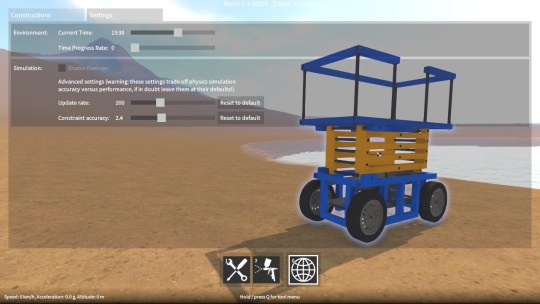
As I mentioned in the last post, swapping joint rigidbody ordering (i.e. owner vs. connected) helped a lot to improve simulation stability at high angular velocities.  Unfortunately it was still not quite enough to get back to Unity 4 / PhysX 2.8 levels of stability.  The simulation update rate also needed to be increased a bit (by reducing Time.fixedDeltaTime), at the expense of performance.  So, as a compromise, I will be exposing a setting in the game to allow the sim update rate to be adjusted.  Advanced users can change it based on the construction that they’re building, and how fast their computer is.

Last few bugs

With these issues taken care of, there’s now nothing to prevent the upgrade to Unity 5.  I’m still working on migrating away from some deprecated APIs and fixing a few remaining (non physics related) bugs, once this is done I’ll be able to put out another demo release.

Unity 5 physics update (again)

Over the past few weeks I have been working on resolving the physics issues that are preventing me from upgrading to Unity 5.  For those that don’t know, Unity 4 uses PhysX 2.8, whereas Unity 5 uses PhysX 3.3, the new version being a major re-architecture of the PhysX implementation as I understand it.  The resulting differences in physics behaviour have caused me a fair few problems.

A while back I outlined these problems, but I’ll run through the remaining ones again here, along with the current state of play for each of them.

Collision contact tolerance
The collision contact tolerance is important to set up so that adjacent parts in a construction have enough leeway to slide past each other without jamming up, while also not allowing parts to sink too far into each other.  In order to replicate the same contact behaviour in Unity 5 as in Unity 4, it turns out you have to set the collider’s contactOffset to the same value you had Physics.minPenetrationForPenalty set to in Unity 4, and then also shrink the colliders by this same amount in all directions.  This shrinking was a bit annoying to have to do, as I use the collider dimensions for other stuff, but at least it seems to have done the trick.

Instability at high angular velocities
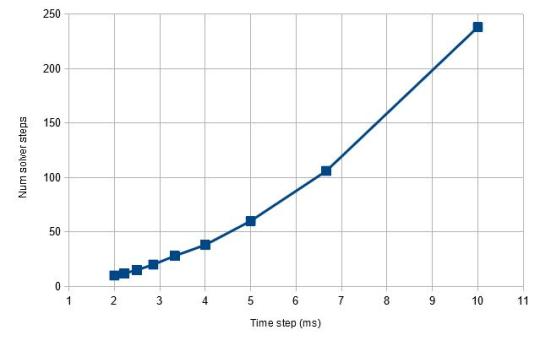
Physics engines, given that they integrate at discrete time intervals (rather than being continuous like IRL physics), often struggle with objects with high velocities, the only way around this really is to update the simulation more often with a smaller time step.  So in order to allow for rapidly spinning parts like gears, axles, etc. in GearBlocks I have to use a small time step (Time.fixedDeltaTime), otherwise things would become unstable and start wobbling all over the place.  However in Unity 5, I had to set it to be even smaller in order to get the same level of stability, unfortunately offsetting much of the physics performance gains over Unity 4!

Each joint connects two rigidbodies, one being the owner of the joint, the other the connected rigidbody.  One thing I discovered that helps with stability is to set up the owner / connected relationship in a particular order.  The PhysX documentation recommends having the rigidbody with the higher mass of the pair be the owner.  I found that it was even more effective to have low velocity parts (e.g. blocks, motors, etc.) be the owner, and those with high angular velocities (e.g. axles) be the connected.  Setting joints up in this way meant I could get stable behaviour in Unity 5 without having to reduce Time.fixedDeltaTime by quite so much.  Unity 5 / PhysX 3.3 seems super sensitive to this ordering, whereas Unity 4 / PhysX 2.8 doesn’t seem to care.  It’s tricky to set up though because I don’t know ahead of time which parts of a construction are going to be the fast spinning ones (and I can’t change the ordering once the construction is unfrozen and moving without causing other problems which I won’t get into here).  So right now I’m working on something that’ll use an educated guess and hopefully get it right in most cases.

Unstable collision behaviour
In Unity 5, for some constructions when contacting flat ground, their collision response with the ground isn’t very stable and they can keep bouncing around for ages after the initial collision.  What’s more, this gets worse the smaller the simulation time step.  Setting up the joint rigidbody ordering as I discussed above seems to reduce this instability though.  Also setting the rigidbody’s maxDepenetrationVelocity to a smallish value helps too.

Joint drives (used for motors)
I was finding that the same force numbers for joint drives were giving different results between Unity 4 and 5.  I discovered that in Unity 4 the JointDrive’s maximumForce value should be multiplied by Time.fixedDeltaTime (which is what I was doing), whereas in Unity 5 it should not.  In other words, Unity 4 expects an impulse value, but Unity 5 wants a force value!

Configurable joint velocity drives
Once I grasped the differences in the way the settings behave, I was able to get these working, sort of.  I found that they still don’t work if the rigidbody’s mass is below some threshold, and there also seems to be a dependency on Time.fixedDeltaTime.  Not really sure what’s going on here, I need to do some more investigation on this one.

Getting there, but more to do

Well, if anyone out there is still in the process of upgrading to Unity 5, I hope my findings might be useful to you!  I’m hopeful I can resolve all this stuff soon, after which I still have to migrate away from some deprecated APIs, and work around a bunch of other bugs and issues I’m having in Unity 5.  Anyway, I can’t wait to put this upgrade to bed so I can get back to actually making the game!

Playable build – updated

Playable build – updated

Playable build – new gear physics

Playable build – new gear physics