The seventh and final episode of the beginner’s tutorial series, introducing the world tool, and wrapping things up!
(Source: https://www.youtube.com/)

The seventh and final episode of the beginner’s tutorial series, introducing the world tool, and wrapping things up!
Episode six of the tutorial series, introducing some more tools, for changing materials and painting your creations.
Five episodes into the tutorial series, and we finally get to try out some gears!
Part four of the tutorial series, this time focusing on parts with controllable behaviours, such as motors and lights.
Episode three of the tutorial series, talking about how to use the different attachment types to make things move!
Here’s the first episode of a new GearBlocks tutorial series for beginners. I’ll be releasing a new episode every day this week!
A new demo update is now live, with the new builder tool model, part attachment options, and more!
Release notes:-
Hey everyone, here’s a brief update on some of the things I’ve done over the past couple of weeks.
Attachment type filtering
Sometimes when attaching a part, other unwanted attachments might be created between that part and other adjacent parts, which the player then has to go and delete afterwards. It would be more convenient if these attachments weren’t created in the first place.
Here’s an example where we’re aligning a beam to an axle, but additional unwanted attachments are being created between the beams:
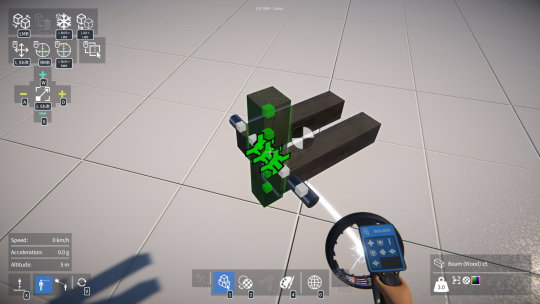
As an attempt at a solution to this, I’ve implemented a way to filter out attachment types during part alignment. There’s now an “advanced options” panel in the builder tool UI, which allows each attachment type to enabled or disabled for part attachment.
Here the fixed attachment type has been disabled in the advanced options panel:
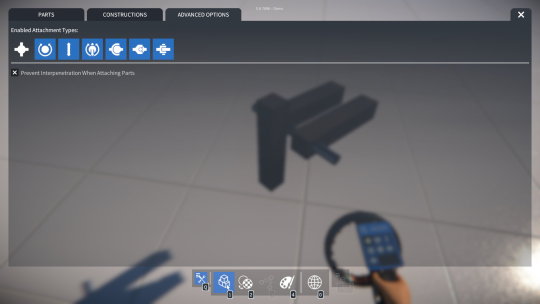
Any disabled attachment types won’t be considered when determining if parts can align together, and any newly created attachments won’t be initialised to a disabled type (and will fall back to the next available allowed type).
So in the example with the beam and axle, disabling the fixed attachment type will prevent attachments from being created to the adjacent beams, but will still allow a rotary bearing attachment to be created between the beam and axle.
Here a rotary bearing attachment is about to be created between the beam and axle, but no other attachments between the beams:
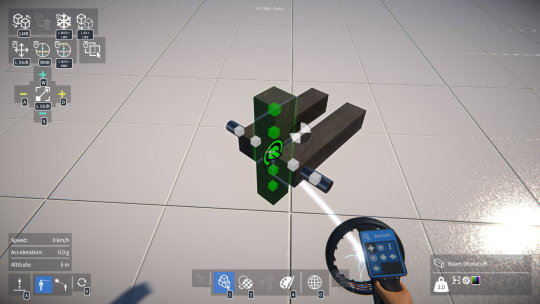
I’ve also modified the builder tool display screen to show which attachment types are currently allowed, as you can see in the images above.
Part interpenetration
There was a bug where, by quickly dragging a selected part while clicking to attach it, it was sometimes possible to attach it such that it interpenetrated another part.
To solve this I now use the attachment’s position and orientation to calculate each part’s new local position and orientation when merging composites together.
However, I think there is value in allowing part interpenetration, as it opens up creative possibilities for advanced users! So, I’ve added an option to the builder tool UI advanced options panel to turn off the part interpenetration test.
I’ll be releasing a demo update very soon with these changes, plus the new builder tool model, and more, so watch out for that!
Hey everyone, time for a quick update on what I’ve been working on over the past month or so.
Scenario mode
If you’ve been following the development of GearBlocks for a while, you’ll know that my plan for a long time has been to build something on top of the current open ended “creative mode” game-play. This is something I’ve been wanting to work on for ages, and now I’ve finally made a start on it! I’m calling it the “scenario mode”, but you could equally refer to it as “campaign mode”, “challenge mode”, or “tutorial mode”. The idea being that it’ll be flexible enough to cater to all of these use cases and more.
My plan is to create a series of scenarios of increasing complexity to gradually introduce new players to the concepts in the game and act as a tutorial mode. Beyond that I’d like to include an additional series of scenarios for experienced builders to challenge them further, but that will come later.
Each scenario may have a limited selection of tools and / or parts to build with, and certain objectives to achieve. Once the objectives are achieved, the scenario is complete, and it may then unlock more scenarios.
The process for creating a scenario is pretty simple. You set it up in creative mode, save the game tagged as scenario, and then it’ll be available to launch as a new game in scenario mode. This way players can create their own scenarios and upload them to the workshop!
So far I have done the following:-
Here’s what the scenario editor UI looks like right now.
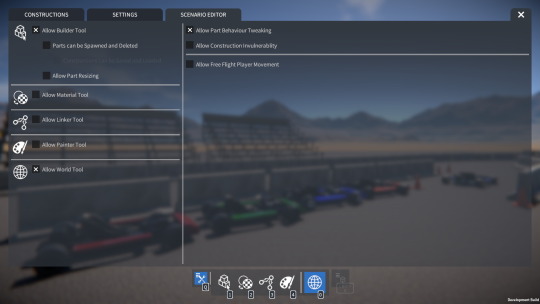
There’s still plenty more to do, for example:-
Beyond that I need to build out some features to facilitate creating objectives (e.g. special parts for start / end trigger zones, gates, etc.) but this is something I’ll discuss in more detail in a future update.
Player tool model
I’ve also been mocking up some ideas for the player character’s tool model, I’m sick of the crappy “box on a stick” placeholder that’s in the game currently!
Originally I was thinking of having a separate model for each tool (builder, linker, painter, etc.), but to reduce scope and simplify things I’ve now decided to have a single universal tool model. However, when the player switches between tools, I still want it to visually represent this somehow, e.g. with a display, visual effects and so on.
I think I know the direction to go in now, and soon I’ll be firing up Blender and getting to work on it.