GearBlocks Demo 0.4.6034

GearBlocks Demo 0.4.6034

Unity 5 physics issues finally sorted

At long last, I have resolved all the remaining physics problems I was having with Unity 5!  As I mentioned in my previous blog post, I had solutions that I was working on for most of these issues, but the one thing I wasn’t sure about was how to fix the joint velocity drives.

Configurable joint drives

One of the things that changed from PhysX 2.X and 3.X, is the way that joint drives are configured.  They no longer have a mode flag to specify whether they are position or velocity drives.  Instead, if you want a “position drive” you set the drive’s spring value to be non-zero, if you want a “velocity drive” you set its damping to be non-zero (and if you set both to non-zero the drive behaves as a damped spring).

The question is, what non-zero value to actually use?  Nothing in the Unity or PhysX documentation seems to help much here.  I use both position and velocity drives in the game, and I want them to be constrained only by the maximum force that the drive is set to use (in other words, fully “stiff” as if the spring or damping values were effectively infinite).

So I tried setting them to float.MaxValue, but this caused some odd behaviour.  Drives configured to be “velocity drives” would not work if the rigidbody’s mass was below some threshold, and those configured as “position drives” would sometimes cause Unity to crash completely without any warning.  In the end, after some experimentation, I simply used a smaller (but still very large) value for the spring / damping settings.  This seems to work alright, although I’m somewhat concerned it could still fail in some unforeseen situations!

Simulation update rate

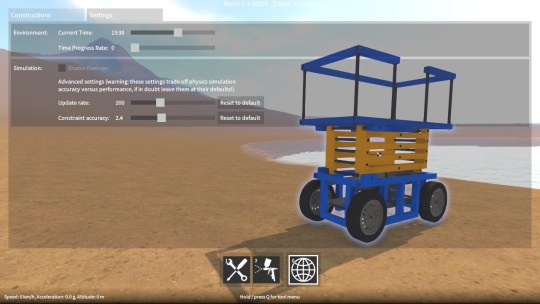
As I mentioned in the last post, swapping joint rigidbody ordering (i.e. owner vs. connected) helped a lot to improve simulation stability at high angular velocities.  Unfortunately it was still not quite enough to get back to Unity 4 / PhysX 2.8 levels of stability.  The simulation update rate also needed to be increased a bit (by reducing Time.fixedDeltaTime), at the expense of performance.  So, as a compromise, I will be exposing a setting in the game to allow the sim update rate to be adjusted.  Advanced users can change it based on the construction that they’re building, and how fast their computer is.

Last few bugs

With these issues taken care of, there’s now nothing to prevent the upgrade to Unity 5.  I’m still working on migrating away from some deprecated APIs and fixing a few remaining (non physics related) bugs, once this is done I’ll be able to put out another demo release.

Unity 5 physics update (again)

Over the past few weeks I have been working on resolving the physics issues that are preventing me from upgrading to Unity 5.  For those that don’t know, Unity 4 uses PhysX 2.8, whereas Unity 5 uses PhysX 3.3, the new version being a major re-architecture of the PhysX implementation as I understand it.  The resulting differences in physics behaviour have caused me a fair few problems.

A while back I outlined these problems, but I’ll run through the remaining ones again here, along with the current state of play for each of them.

Collision contact tolerance
The collision contact tolerance is important to set up so that adjacent parts in a construction have enough leeway to slide past each other without jamming up, while also not allowing parts to sink too far into each other.  In order to replicate the same contact behaviour in Unity 5 as in Unity 4, it turns out you have to set the collider’s contactOffset to the same value you had Physics.minPenetrationForPenalty set to in Unity 4, and then also shrink the colliders by this same amount in all directions.  This shrinking was a bit annoying to have to do, as I use the collider dimensions for other stuff, but at least it seems to have done the trick.

Instability at high angular velocities
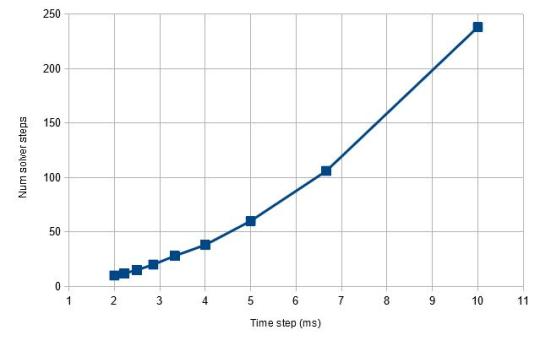
Physics engines, given that they integrate at discrete time intervals (rather than being continuous like IRL physics), often struggle with objects with high velocities, the only way around this really is to update the simulation more often with a smaller time step.  So in order to allow for rapidly spinning parts like gears, axles, etc. in GearBlocks I have to use a small time step (Time.fixedDeltaTime), otherwise things would become unstable and start wobbling all over the place.  However in Unity 5, I had to set it to be even smaller in order to get the same level of stability, unfortunately offsetting much of the physics performance gains over Unity 4!

Each joint connects two rigidbodies, one being the owner of the joint, the other the connected rigidbody.  One thing I discovered that helps with stability is to set up the owner / connected relationship in a particular order.  The PhysX documentation recommends having the rigidbody with the higher mass of the pair be the owner.  I found that it was even more effective to have low velocity parts (e.g. blocks, motors, etc.) be the owner, and those with high angular velocities (e.g. axles) be the connected.  Setting joints up in this way meant I could get stable behaviour in Unity 5 without having to reduce Time.fixedDeltaTime by quite so much.  Unity 5 / PhysX 3.3 seems super sensitive to this ordering, whereas Unity 4 / PhysX 2.8 doesn’t seem to care.  It’s tricky to set up though because I don’t know ahead of time which parts of a construction are going to be the fast spinning ones (and I can’t change the ordering once the construction is unfrozen and moving without causing other problems which I won’t get into here).  So right now I’m working on something that’ll use an educated guess and hopefully get it right in most cases.

Unstable collision behaviour
In Unity 5, for some constructions when contacting flat ground, their collision response with the ground isn’t very stable and they can keep bouncing around for ages after the initial collision.  What’s more, this gets worse the smaller the simulation time step.  Setting up the joint rigidbody ordering as I discussed above seems to reduce this instability though.  Also setting the rigidbody’s maxDepenetrationVelocity to a smallish value helps too.

Joint drives (used for motors)
I was finding that the same force numbers for joint drives were giving different results between Unity 4 and 5.  I discovered that in Unity 4 the JointDrive’s maximumForce value should be multiplied by Time.fixedDeltaTime (which is what I was doing), whereas in Unity 5 it should not.  In other words, Unity 4 expects an impulse value, but Unity 5 wants a force value!

Configurable joint velocity drives
Once I grasped the differences in the way the settings behave, I was able to get these working, sort of.  I found that they still don’t work if the rigidbody’s mass is below some threshold, and there also seems to be a dependency on Time.fixedDeltaTime.  Not really sure what’s going on here, I need to do some more investigation on this one.

Getting there, but more to do

Well, if anyone out there is still in the process of upgrading to Unity 5, I hope my findings might be useful to you!  I’m hopeful I can resolve all this stuff soon, after which I still have to migrate away from some deprecated APIs, and work around a bunch of other bugs and issues I’m having in Unity 5.  Anyway, I can’t wait to put this upgrade to bed so I can get back to actually making the game!

Unity 4.6 UI upgrade

Hey everyone, apologies for the lack of GearBlocks updates recently.  I’ve been working on porting all of the menus and other UI over to the new UI system that was introduced in Unity 4.6.  I wanted to get the port out the way sooner rather than later, before I add any new features that require UI changes or additions.  Unfortunately it’s taken me much longer than expected, I’m getting there, but I probably still have one more week left to go on it.

Previously I was using the old immediate mode UI system, which has its well known limitations that I won’t go into here, I’m guessing it will eventually be phased out in future releases of Unity.  The new system is for sure a lot more powerful and flexible, and of course you get to properly lay out your UIs in a WYSIWYG fashion.

Issues with the new UI system

Unfortunately once I got into it, I found there were some downsides to moving to the new system.  For instance, some of the features of the immediate mode UI I was using (e.g. selection grids) do not come “built in” and I had to write additional code to replicate them.  Also, some bits of the UI that I populate at run-time (e.g. the parts list in the inventory screen) required significant rework to the code that does the populating (simply because of the totally different philosophies of the old vs. new UI system).  The most troubling issue though was the performance of the new UI system, I discovered if you’re not careful you can easily add many ms. to your frame time, with spikes in the hundreds of ms!

UI performance problems

GearBlocks has many separate UI screens that the user can transition between.  The “standard” way to implement this in the new UI system (at least from the tutorials I’ve seen) is to use an animation controller to blend each screen between an open and closed state, these states setting the screen’s CanvasGroup visibility and interactibility.  However I found that the animation blend added a couple of ms. (from Animator.Update and Canvas.BuildBatch) during a transition.  Even worse, despite all screens (apart from the currently active one) being invisible and non-interactible), they still all seemed to get processed and I found that this resulted in several ms. of overhead from the EventSystem update.

To get around the transition blend cost, I did away with animations for the in-game UI and just did the transitions directly from code (I kept using animations in the main menu though as the performance cost isn’t so critical there).  For the second problem, I wanted to eliminate any cost for a non-active screen – it’s not really practical to go through and disable each and every UI behaviour, so I tried deactivating the screen’s root GameObject.  Unfortunately, while this does eliminate the continuous frame-by-frame cost, it can result in huge performance spikes when activating / deactivating the GameObject (I found hundreds of ms. if you have a complex screen with ScrollRects), so it’s not a viable option.

Luckily I found another solution, which is to have a separate Canvas and GraphicRaycaster for each and every screen, then enable / disable these to transition between screens.  This way you get the best of both worlds, no cost for inactive screens, and no cost to activate / deactivate them.  I get the impression this is a common trick people use to get around this problem.  It seems like there are a few performance tricks people are discovering (such as disabling Canvas “pixel perfect” when using ScrollRects).

Well, hopefully I’ll be done with the UI port soon, and then I can get back to adding new stuff to the game!

Unity 5 physics update to the update

For some time I’ve been trying to resolve the physics issues after upgrading GearBlocks to Unity 5.  I’ve had success with some issues, not so much with others.  I’ll sum up where I’ve gotten things to so far.

Rigidbody rotation unfreezing
When unfreezing a rigidbody, its rotations weren’t being unfrozen, this bug happens if you had already modified the rigidbody’s inertia tensor.  After submitting a bug report, I heard back from Unity – turns out the workaround is to restore the inertia tensor after unfreezing, which works fine.

Collision contact tolerance
The collision contact tolerance seems to have significantly changed with Unity 5.  What I thought was my gear constraints not working properly was actually due to the moving parts (blocks, axles and gears) within a construction colliding with each other, and everything was getting all jammed up.  One workaround I tried was to shrink the colliders, trouble is I had to shrink them by quite a large amount and even then I’d still get occasional unwanted collisions.  Another option would be to disable collisions altogether between neighbouring parts, but that’s problematic as you might actually want them to collide in certain situations.

Unstable collision behaviour
For some constructions when contacting the ground, their collision response with the ground is kinda jittery and they keep bouncing around for ages after the initial collision.  After some experimenting, it seems this behaviour is worse with the small fixed update (i.e. physics update) time step I’m using (5ms vs. the default 20ms).  Not much I can do about that though, as I need the smaller time step for accuracy with fast spinning stuff.

Instability at high angular velocities
On the subject of fast spinning stuff, despite the aforementioned small time step (and also a high solver iteration count), gears / axles spinning a high rpm now become unstable and start wobbling around.  With the same settings in Unity 4 this was rock solid.  I tried playing around with these settings but I couldn’t get it to be stable, more experimentation is required, but this could be a real show stopper.

Hinge joint motors
When switching on a joint motor, there is a bug in Unity 5 that means the connected rigidbodies don’t get woken up, and so they don’t start moving if stationary.  The workaround is to explicitly wake up the rigidbodies when turning the motor on.  I also found I had to multiply my torque values by a factor of around 50 to get similar behaviour to that in Unity 4.6.

Hinge joint limits
I use angular limits to force a hinge joint to a particular angle by setting the limit min and max values both to that angle, but this stopped working properly in Unity 5.  I found the fix was simply to ensure there is a small delta between the min and max.

Configurable joint velocity drives
I still can’t get these to work at all, I submitted a bug report to Unity but haven’t heard back so far.  Hopefully they’ll be able to fix this one.

In summary, I’ve got fixes / workarounds in hand for most issues now, but there are still a couple of show stoppers (namely velocity drives and stability at high angular velocities).  So for now I’m still sticking with Unity 4.6, I really need to get back to making actual progress on the game!

Unity 5 physics bug update

Over the last week I also had a look at some of the Unity 5 physics bugs I mentioned in an earlier post.

It turns out the rigidbody freezing bug only happens when I modify a rigidbody’s mass properties (i.e. mass, inertia tensor etc.)  I was quite easily able to repro this in a very simple project, so I’ll send this off to Unity when I get a chance.

After browsing the Unity forums I found out that hinge joint motors not working is caused by the motor not waking up the rigidbody.  As a temporary solution, if you force the rigidbody to wake up every update, the motor works.  I also found I had to multiply my torque values by a factor of around 50 to get similar behaviour to that in Unity 4.6.

Velocity drives definitely aren’t working for me.  Again, I was able to repro this in a very simple project.  One for another bug report.

I haven’t had a chance yet to look at the hinge joint limit and OnCollisionExit issues, but I’ll keep chipping away at these next week.  I also noticed that my gears don’t seem to be working properly, sometimes the gears (particularly rack gears) get stuck.  I checked and the configurable joints I’m using for the gear constraints do still seem to be updated correctly, so I’m not sure what’s changed here.  I always was concerned I’d find some slightly different behaviour in Unity 5 with PhysX 3.3 that would unavoidably break the delicately tuned physics setup in my game, and this may be evidence of that.  Let’s hope not, more investigation required!

Unity 5 upgrade on hold for now

This week I tried porting over to Unity 5.  It went pretty smoothly to start with, a few shader and code tweaks were required to get everything running properly, but nothing too bad.  However once I got things going I found some pretty fundamental physics bugs that totally break my game:-

  • Once frozen, rigidbody rotations can’t be unfrozen (positions are fine).
  • Joint motors, limits and velocity drives seem to be non-functional (at least when setting them from code).
  • The OnCollisionExit callback never seems to be called.

It’s a pity really, as I can already tell the physics performance is significantly improved (which I sorely need!), but for now I’ll have to stick with Unity 4.6.  Hopefully Unity will resolve these issues fairly soon.

In the meantime I’ll have to re-jig my task plan a bit, but it shouldn’t hold things up too badly.