A new GearBlocks dev diary demoing the spring damper parts.
(Source: https://www.youtube.com/)

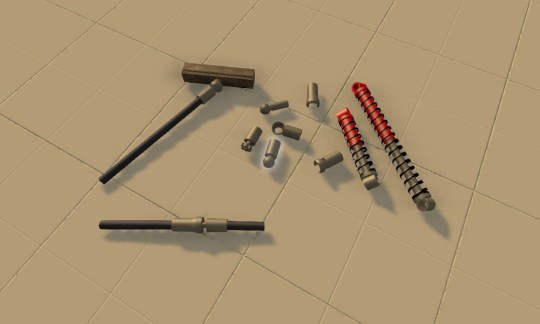
Spring dampers
The latest GearBlocks demo build now has coil-over spring dampers that can be used to build all kinds of suspension for your vehicles! The spring rate and damping can be adjusted through the part behaviour menu (accessed in the usual way, hover over and hold Shift + E).
I had the physics side working nicely early on, but it took a while to figure out the best way to present the spring / damper functionality to the player, within the constraints of my construction system. In the end I decided to have two parts, a “barrel” and a “piston” that the player fits together to form the spring damper unit. Originally I was hoping to provide a pre-assembled unit to avoid making the player do this, but it would have required too many changes to the construction system to allow for “multi-element” parts. Anyway, this way allows the barrel and piston to be attached in different orientations which is a bonus.
Now, actually using the spring dampers for something useful (like car suspension) might not be immediately obvious, so I’ll make a video soon to go over this.
Ball and Socket joints, CV joints
I have also just finished working on adding a whole new set of connecting joints to the game. There are ball and socket connectors that snap together and can attach to axles or blocks. They allow the connected parts to rotate through all three axes, and are essential for building a proper steering mechanism with a vehicle that has suspension, but they have many other uses too.
I’ve also added constant velocity joints, which attach axles together and allow rotational drive to be transmitted through changing angles. These are useful for building drive shafts for vehicles with suspension, and / or front wheel drive (or four wheel drive).
These parts are not available in the demo, as I’m keeping them back for the full game. I’ll be doing a video on these too though, to show how they can be used, it can get pretty complex!
Full game features
Over the past couple of weeks I’ve been working on some new features: the challenge game mode and construction damage. These won’t be in the demo (got to hold some things back for the full game!) but I thought I’d talk about them so you know what I’ve been working on.
Right now the challenge mode just consists of built in saved games that you can choose from as starting scenarios. The plan is to extend this to add various possible constraints (e.g. a limited part budget) and scoring / win criteria. Eventually there will be a system where you earn points by completing challenges to unlock later, more advanced challenges. There’s still a long way to go on this feature!
I’ve also been working on my first attempt at a damage system. Each attachment starts with an initial “integrity” level based on the material strength of the two parts it joins. When a construction sustains impact, damage is propagated to its attachments, reducing their integrity level. Once an attachment’s integrity reaches zero it is deleted, causing parts of the construction to break off. Note that the parts themselves don’t get damaged or destroyed, only attachments; I decided to do it this way for simplicity.
UI improvements and bug fixes
There are still plenty of new things in the demo though, I have made some UI improvements (animated loading screen, saved game images, and other tweaks), plus a bunch of bug fixes. I’ll keep continuing to update the demo, wherever I improve or bug fix an existing feature. I’ll still be adding one or two new parts to the demo as well!
UI upgrade complete
It took way longer than I was hoping, but finally I’ve completed the re-implementation of all the menus and screens using the new Unity UI system! This will hopefully pay dividends down the line by making it easier to add new features that require UI.
Just built this in the game, a plane with working 4 cyl boxer engine, ailerons and rudder. It doesn’t actually fly though because there are no wing lift physics in the game (yet), but it taxis around pretty good. 🙂
New in this build
Over the last week I (hopefully) fixed some of the physics bugs that were a point of frustration for people:-
Getting the word out
I’ve now created an Indie DB page for GearBlocks, from now on I’ll be hosting the demo builds there rather than on Dropbox. I’ve also created Greenlight Concepts and Facebook pages for the game.
I’ve also been playing around with a logo for the game, which was fun I have to say!

Latest build
In the latest demo build, I’ve enabled the new save game system that I mentioned in a previous post. As well as being able to save your constructions, this also provides a rudimentary way of sharing them with your friends. Saved games are stored as files in the SaveGames directory in the GearBlocksDemo folder (i.e. right next to the executable, you can create it if it doesn’t already exist). You can load up someone else’s saved game by copying their file into this directory.
GearBlocks
Well, my as yet unnamed game now has a title – GearBlocks. It was quite hard to think up a name that summed up the game in some way, as well as being short, easy to remember, and not already in use. In the end I had to just pick something and go with it!
Full vs. demo builds
I’ve now set up a simple build pipeline that lets me build demo or full versions of the game. As I add more stuff to the game, this will allow me to easily exclude certain features or content from the demo.
Build versioning
Builds of the game are now versioned, and the version number is shown in the game. This means I can release standalone builds of the game on a regular basis from now on, yay!
Phasing out the web player
https://dl.dropboxusercontent.com/u/157530041/GearBlocksDemo.html
For now the web player build is still available at the link above. I think I’m going to stop bothering with it soon though, and just release the standalone version, as there are starting to be too many difficulties with it:-
Save game system overhaul
Over the last week I have completely reworked the save / load system. Previously I was using Unity’s PlayerPrefs to save game state into, which was only ever a temporary solution. The PlayerPrefs are only intended for small amounts of player settings data, not for save games.
Now I serialize everything into a single binary file per save game (into a local “SaveGames” directory). This does away with the old fixed slot based system and allows you to name your save games and have as many of them as you want.
This works great for the standalone build, but the Unity web player doesn’t allow file IO for obvious reasons. So for the web player I tried saving the binary data into PlayerPrefs (much like I used to do with the old save game system). This works fine, however the .NET serialization I’m now using doesn’t seem to work in the web player (deserialization fails with a FieldAccessException for some reason). I don’t have time to look at this right now, so I’ve had to disable save / load in the web player for now.
Over the past week I have continued working on the game design and project plan. This has taken most of my time, but I have also made some improvements to the build.
Unfreezing / deselecting inside the terrain
Previously if you deselected or unfroze a construction while it was positioned inside the terrain, it would immediately be free to move under physics. Due to the interpenetration with the terrain a massive impulse would then be applied, flinging your construction way up in the air, which was very annoying. To get around this, for a construction that is currently interpenetrating the terrain, deselecting it will simply freeze it, and unfreezing is prevented until it’s moved away from the terrain. Hopefully this will eliminate one of the big frustrations while building constructions in the game!
New parts
I have made some new assets for the electric motor and servo motor. Note that the new servo motor is a different size to the old one, so this may affect your existing saved constructions. I have also added 4 unit length beams.
Other than that I’ve done a few minor bug fixes and code cleanup. Next task I think is to port over to Unity 5 to see how that goes, might be a big job, not sure yet.