As promised, here we are showcasing some more awesome builds from the GearBlocks community, thanks everyone!
(Source: https://www.youtube.com/)

As promised, here we are showcasing some more awesome builds from the GearBlocks community, thanks everyone!
Here are some of the amazing constructions you guys have built in Gearblocks over the past year or so! Big thanks to everyone who has played the GearBlocks demo and built such cool stuff! I couldn’t fit everything in one video, part 2 will be coming soon…
It’s been a while since the last update, so I thought I’d do a quick post on what I’ve been up to! A couple of weeks were taken up with travelling back to the UK for a bit, and I was sick all last week which took me out of action unfortunately. I have been working on the game though over the past several weeks…
First person controller
The current first person camera controller in the game is basically a prototype implementation. It’s buggy and missing a lot of features, for example: camera smoothing, crouching, head bob, and so on. My plan was to switch over to the excellent UFPS from Opsive (available on the Unity asset store: http://u3d.as/2Jc) which has all these features and more. Unfortunately that didn’t work out, mainly because I couldn’t bring across only the code I wanted from UFPS (character and camera controller) without either modifying it or also including a lot of other stuff I don’t need (e.g. inventory, weapons, damage etc.)
I think UFPS is great as a starting point for a first person game, but trying to integrate it in at this late stage of a project probably isn’t practical. So now my plan now is to keep what I have and gradually improve it, probably stealing code from UFPS as necessary!
Deprecated networking API
I have a rudimentary networked multiplayer mode for GearBlocks, and in fact even the single player mode runs through the same code paths. I want to keep this working so that I have a good starting point should I wish to revisit multiplayer in the future. Right now I’m using the old Unity networking API, which was causing a bunch of annoying “obsolete API” compiler warnings, because it’s recently been deprecated in favour of their new system, UNET.
I looked into what it would take to upgrade to UNET, using their high level API (HLAPI). Unfortunately there were all sorts of awkward problems with this (like needing to derive from NetworkBehaviour, which didn’t play nicely with my generic singleton implementation for some reason). The whole thing was turning into a massive change that would break the entire game until I completed it. Not to mention it’s still fairly early days for UNET and it’s changing quite a bit as Unity continues to develop it.
Besides, ultimately I might be better off using their low level networking API, but that would obviously take even longer to implement. Or, perhaps using a third party system like Photon Bolt would be a better way to go. I’d need to spend a lot more time on this to figure out the best thing to do, so I’m leaving it for now. Instead, I um…disabled those pesky deprecated API warnings, there you go, job done!
What’s next
So, it’s generally been a frustrating few weeks, hopefully I can get back to being more productive now! I’ve been prototyping something for the game, not sure if it’ll work out yet, but I’ll be continuing with that.
Also, I’m going to work on improving the construction controls, in particular to help new players pick up the game and get started. Well, that’s the plan anyway!
New desert map
At long last, I have done away with the old procedurally generated terrain. I decided that it made more sense to have a few decent “hand crafted” maps in the game, rather than an almost infinite number of crappy ones!
So, now in it’s place there is the new desert map. This is still a work in progress, I have a lot of details still to add to it, but the main thing for now is that it at least has a flat area to build on without stuff rolling away. In the full game I plan on adding other maps based in different settings (e.g. forest, grassland, salt flat, snow / ice, etc. haven’t quite decided yet).
Rendering improvements
Having upgraded to Unity 5 this allowed me to make the switch over to physically based rendering (PBR). Besides making things look pretty, PBR serves a practical purpose in that you can now visually distinguish materials (e.g. metal actually looks like metal now). It also makes it much easier to achieve consistent lighting across the whole scene.
I’ve also upgraded the time-of-day system, and tweaked the post effects too.
Saved game format
The saved game format has changed slightly, so old saved games won’t work in this build. However, saved constructions from the previous build version (0.4.6034) should still load OK. If you have saved constructions from versions earlier than that, I’d recommend loading them in build 0.4.6034, then save them back out, they should then load properly into the new build.
Just a quick dev update to talk about some new construction UI features and other recent work I’ve been doing on the game.
New construction system done (mostly)
In the last dev update I discussed the new part alignment search system I was working on. At that point there were a couple of things left to do: implement a bounding volume hierarchy for part bounds, and implement the part collider intersection tests. The second of these two is now done, which means the game is now functional again. I decided to do the BVH as an optimisation step later, as the game works fine without it (albeit with reduced performance in certain cases), and I wanted to get a new demo release out ASAP!
UI improvements
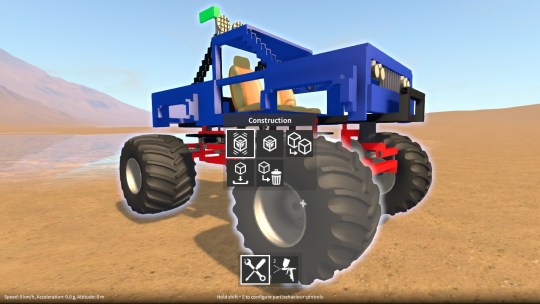
I have also implemented some new features that are in the latest demo. In the construction menu (to access, highlight a construction and hold shift + hold / press Q), there are some additional buttons to activate / deactivate all of the construction’s part behaviours. So you no longer have to hunt through all the parts in a construction and activate each behaviour individually.
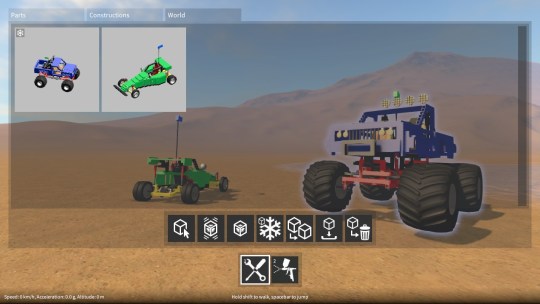
In the builder tool UI, there’s now a new “world” tab. This contains a list of constructions currently in the world and provides the ability to pick a construction and then remotely: select it, activate / deactivate all of its behaviours, toggle it frozen / unfrozen, clone it, save it, or delete it. So if you ever lose a construction because it rolled away down a hill, at least you can always get it back now!
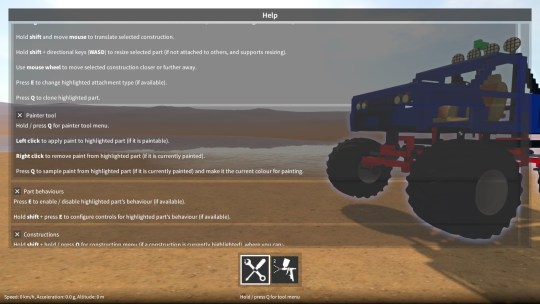
There are also a few other improvements and tweaks, such as a help window summarising the game controls (accessed by holding / pressing F1).
Next up
I’m now at a point where it’s time to revisit the Unity 5 upgrade again (can’t put it off any longer!), so I’ll be looking at that next. I’m not entirely sure how this is gonna go, but I just hope I can find a way around the remaining physics issues.
Beyond that, there are a ton of things I really want to get to, the main ones being: improving the environment / map (having flat area to build on), making the construction controls better, and implementing a challenge / tutorial system.
Having some fun with a monster truck I just made in GearBlocks. This design will be included as an example construction in an upcoming demo release very soon!
As I haven’t put out an update in over a month, I thought it’d be a good idea to explain what I’ve been working on. Be warned, this is gonna be long (and probably tedious)!
As I alluded to in an earlier post, I wanted to come up with a better system for determining attachment points between parts when the player is building their constructions. The existing old implementation (which had been around since the initial prototype) had some fundamental problems and was long overdue for replacement. I’d been putting this task off since it’s a big job to re-implement such a core part of the game (during which the game is basically broken) but finally the time came to tackle it!
Before I get into implementation details, let me describe the construction process a little. Here’s the scenario; the player has a part selected (which may be part of a larger construction consisting of many parts), they rotate their selection to the approximate desired orientation, and highlight another part with their cursor (again, which may be part of a larger construction) at roughly the location where they want the selected part to go. During which the construction system continually ensures that their selection is aligned correctly to the highlighted part, and checks that attachment is allowable. Once the player is happy they can opt to finalise the attachment, in so doing merging the two constructions together.
So, every frame, as the player moves their selection and / or highlight location, the construction system must update itself in order to be ready for merging the two constructions together. There are essentially two phases to this update.
Phase one – alignment
Automatically align the selected part to the highlighted part:-
Phase two – attachment search and validation
Based on the current relative locations of all the parts in the selected and highlighted constructions (after being aligned by phase one) it must then:-
The first phase isn’t a big deal because it only ever has to search the alignment points within two parts. However, the second phase (at least naively) needs to compare every alignment point in every part in the selected construction against every alignment point in every part in the highlighted construction. This O(n^2) type of search is obviously not practical as it would quickly get very slow with larger constructions (or even with parts that have many alignment points). A more optimal approach is needed and this is the crux of the problem.
Early on in the project, rather than creating my own spatial search system, I decided to try and simplify things by making use of Unity’s physics in order to help with the second phase attachment search described above. At a high level, this worked as follows:-
As a side note, you may wonder why I used OnCollisionStay rather than OnCollisionEnter and OnCollisionExit. That’s because if the player moves parts relative to each other but their colliders don’t happen to exit and re-enter, I wouldn’t get updated contact points.
Problems
Despite serving fairly well for a long time, this implementation had some fundamental issues that I was never able to satisfactorily work around:-
In short, this method was buggy, slow, and would make upgrading to Unity 5 awkward.
I decided I needed to break my dependency on using Unity physics for solving this problem. This would avoid the fixed update vs. frame update problems as well as the frozen rigidbody performance costs and issues.
The solution I’m currently working on goes somewhat like this:-
Right now I have a good portion of this new solution working, including the new alignment grid system, but there are still two major pieces left to do:-
Once this is all done, the new construction system won’t seem much different from the outside to the player. However, it will be more stable, perform better, and remove one more roadblock to the Unity 5 upgrade.
Speaking of which, the Unity 5 upgrade is what I want to look at after, although I may put together some stuff for another demo release first, we’ll see!
New parts
Since the last update that introduced the new part pairing system, I’ve been creating new types of parts that take advantage of this, including new connectors (ball and socket, CV joint, etc.) and specialised suspension parts. These new parts allow for fully independent suspension with steering and front / rear / four wheel drive (even four wheel steering if you want!) I’ve also added other new parts with new behaviours – a stepper motor and hydraulic actuators whose linear movement can be controlled by the player.
I’m keeping these new parts under wraps for now, but I can show some others that I’ve also added which are variations of existing parts – a new large spring damper, new gear sizes, new motors of different sizes, and more wheel variations. I got tired of the old motor and wheel models so I spent some time brushing up on my 3D modelling skills and made some new ones! I’m pretty happy how they turned out although they still need tweaking and UV mapping at some point. I plan on adding many more variations for wheels, seats, lights etc.
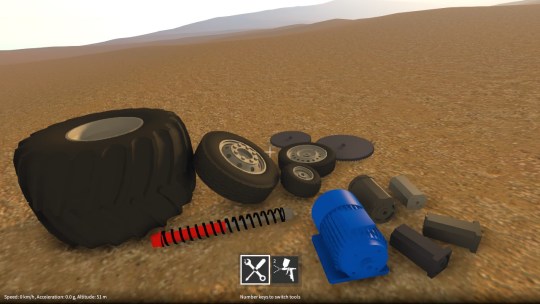
Note that no additional parts are in the demo, but I have updated all the existing demo parts with their new versions.
Part alignment
I’ve also been working on how parts align together during construction, so that this system works better with the new parts I added. This was mainly to prevent axles penetrating through parts, and to make the alignment behaviour a bit more intuitive. Some parts (such as motors) are now slightly more restrictive in how they can attach to other parts. On the other hand, the spring damper barrel and piston parts are now less restrictive in that they can now be attached together at several different alignment points, which allows for different “default” spring extensions when the construction is frozen.
Other changes
I’ve changed the underlying physics implementation of rotary attachments (hinges) to be in line with all the other jointed attachments. Among other things, this allowed me to add a configurable torque value to the servo motor part behaviour. Finally, a bunch of other things have been tweaked, including new UI elements, SFX and so on.