…and here’s a video of the tractor. It could do with some proper wheels and the steering would work better with the ball & socket connectors, but I was limiting myself to parts available in the demo.
(Source: https://www.youtube.com/)

…and here’s a video of the tractor. It could do with some proper wheels and the steering would work better with the ball & socket connectors, but I was limiting myself to parts available in the demo.
Gah, I can’t believe it’s been a month already since the last blog post! It’s been a frustrating time to be honest. I’ve been planning on setting up a company for a while, to put GearBlocks on a more official footing (it’s something I should have done a long time ago really). The trouble is I’m having a hell of a time trying to think of a name for the company (all the ideas I’ve come up with seem to be already taken)! It seems ridiculous that a relatively trivial thing like this is holding me up, but hopefully I can figure it out soon and move on.
In the meantime I have made some progress with the game though. The Unity 5.6 upgrade is now done, the rendering issues I was having weren’t too bad to sort out in the end. Also, I was tired of having old placeholder part assets still left in the game, so I’ve finally removed / replaced / reworked the last of these.
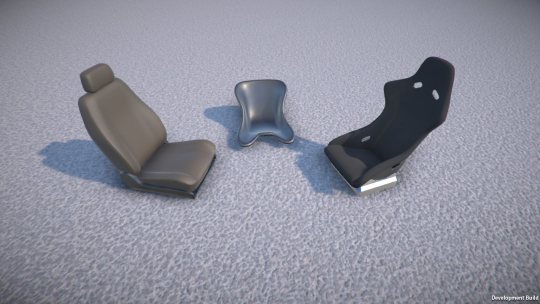
These are the new seat models I’ve made so far, I plan on adding more types & variations of seat later (any suggestions welcome!)
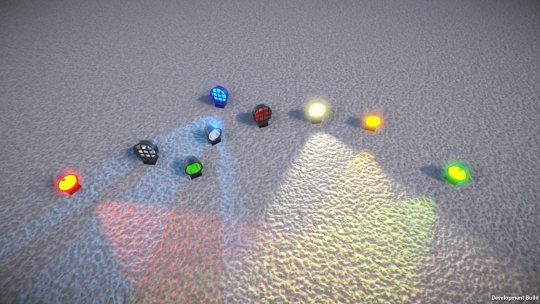
Here are the new lights (again, at some point I plan on adding more styles / types of light). Their lenses are now paintable, so you can have any colour lights you like!
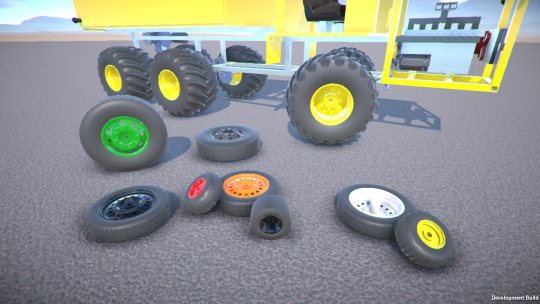
It was a small change to make the wheel rims paintable too, so I decided to do that while I was at it.
Well, the next demo release is pretty much ready to go now, it’s just waiting on me getting the company set up, as I want to have that all sorted first!
Here’s just a brief update on what I’ve been up to over the past few weeks. Most of the work has been focused on further improving the usability of the game (better UI, controls, customisation, etc.)
Construction controls improvements
I’ve redone the part resizing input code so that now when you press a resize key it responds immediately (before it was kinda sluggish to respond).
I’ve also made a tweak so that you can now freeze the selected construction in place while aligning to another construction, this can be useful to check positioning and so on before committing to attachment.
Configurable key and mouse button bindings
The main thing I’ve been working on recently is a complete overhaul of the input system. You can now fully customise key (and mouse button) bindings to the various actions in the game. There’s now a new tab in the controls settings where you can set this up. You click the button for the action you want to configure, it’ll then wait for a key press, that key then getting bound to the action.
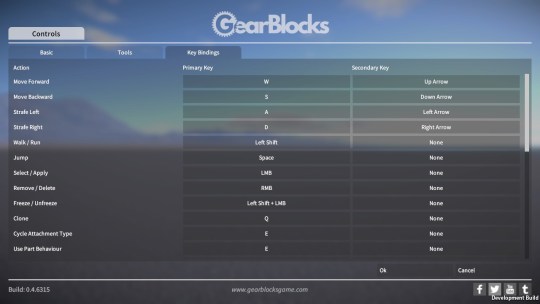
I’ve also modified the player controllable parts (e.g. motors) that have configurable key binding to work in the same way. This means you can now bind any keys to them, not just letters and numbers.
The only thing still left to do here is to allow configuration of joystick / controller inputs, something I’ll revisit at a later date.
Improved graphics settings
The other customisation improvement I’ve made is to the graphics settings. I’ve done away with the (vague and too high level) “quality settings”, and set up proper options that’ll give you more fine grained control when configuring the graphics quality vs. performance of the game.
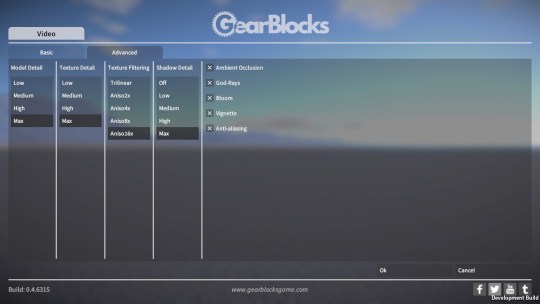
Other things
Some other bits and pieces I’ve also done:-
I’m working hard on getting another demo release out so that you can try all this new stuff out. Unfortunately there always seems to be something that gets in the way! Currently I’m in the middle of upgrading to Unity 5.6 which has broken some rendering stuff, so that’s what I’m working on right now, hopefully I’ll get this sorted soon.
Over the last couple of weeks I’ve done some more work on the in game UI.
I’ve removed the old text overlay that showed the name of the highlighted part, as it was positioned near the cursor and kind of in the way. Now I have a new overlay in the bottom right corner that shows not only the part name, but other details such as its mass, whether it’s paintable or resizable, and info on its behaviour status.
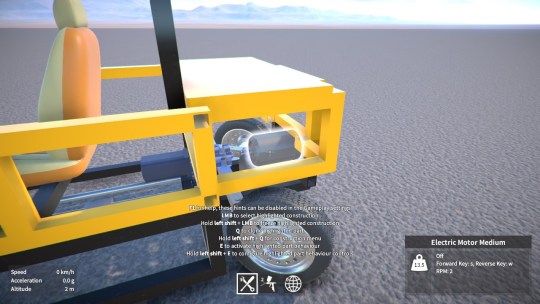
I’ve also added a similar overlay for when you’re hovering over an attachment in a frozen construction. It displays the available attachment types that you can cycle between (highlighting the current attachment type), and it’ll also show info on other things like attachment integrity (if damage is enabled).
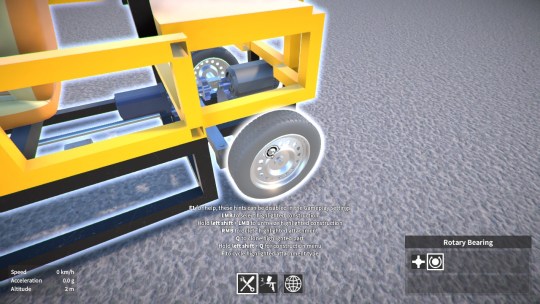
During part resizing, rather than add yet another UI display to show which keys to use
to resize in each direction
(as I was originally thinking), I decided instead to just colour code the relevant parts of the hints text.
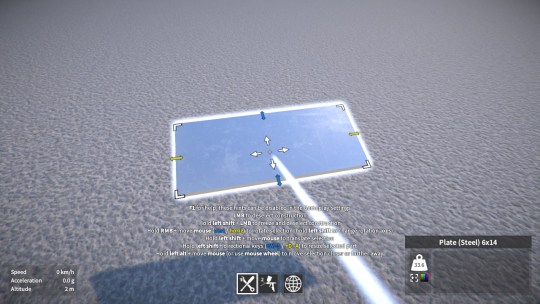
Finally, to help the new UI elements fit, and clean up the look of the UI generally, I’ve also made the whole thing scale based on the screen dimensions. This means that (in full-screen mode), the UI elements appear the same size regardless of the screen resolution. I think this is a big improvement, especially at lower screen resolutions.
OK, time for a long overdue GearBlocks progress
update. As I’ve mentioned in previous posts, I wanted to improve the construction controls, to try and make them a bit more approachable and accessible, and this is what I’ve mostly been working on over the past couple of months.
Failed ideas
I wanted to explore some new ideas in an attempt to improve part positioning and alignment, and also part resizing.
So I tried making a prototype of a “snap to” grid aligned to the overall frozen construction (instead of to the currently highlighted part as it is now). While the player is positioning the selected construction ready for attachment, I had a 2D planar grid aligned to the frozen construction that the selection snapped to at unit intervals. The player could then move this plane up and down along its normal (also at unit intervals) using the mouse wheel, thereby allowing snapped positioning in full 3D space. There would also need to be some provision for snapping to half unit intervals, although I didn’t get that far with it. This seemed promising initially, but what killed the idea for me in the end was the realisation that (unlike the current system) it doesn’t easily allow for attachment at arbitrary angles, everything has to be aligned at 90 degree intervals relative to the frozen construction. At least I couldn’t think of a practical way around this, and I certainly didn’t want to make it less flexibile than what I already have.
As for part resizing, I thought about separating it out into another tool (with handles that you drag around to resize the part), but not only is this more complicated to implement, I actually think it would be less convenient to use. Every time you want to resize a part you’d have to deselect it, switch to the resize tool, do the resizing, switch back to the builder tool, and select it again.
So in the end I decided against making any radical changes to the current construction controls, and instead focus on improving what’s already there. Let’s go over the changes I ended up making.
Construction alignment
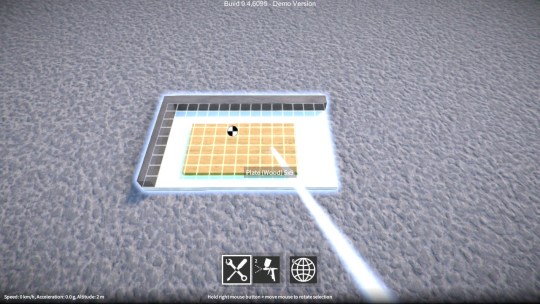
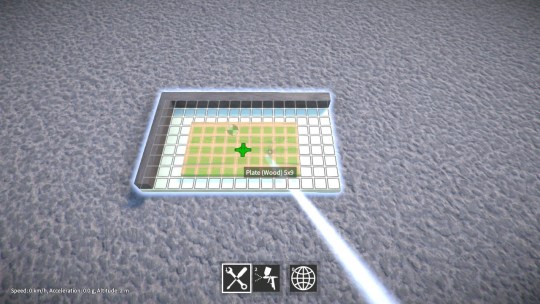
One issue with positioning parts is that the alignment grids aren’t always easily visible. Also, because they’re drawn on top of the parts themselves, it sometimes makes it hard to tell which parts are in front of each other, or even which part you’re about to attach to. So I changed the grid textures to make them clearer, and modified the shader to fade them out slightly where drawn “behind” objects. You can see the difference between the old and new grid below.
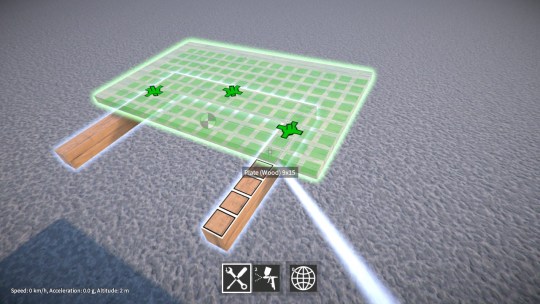
Another problem is that when you’re aligning parts together, you don’t know where the individual attachments will be created. So now during alignment, indicators are shown for the attachments that will be created, an example of this is shown below.
Lastly, rotating the selected construction can be kind of awkward at times, and I wanted to see if could improve this in any way. I tried making the rotation be limited to one axis at a time during alignment, and that turned out to help a quite lot because it prevents “drift” away from the player’s intended rotation.
Part resizing
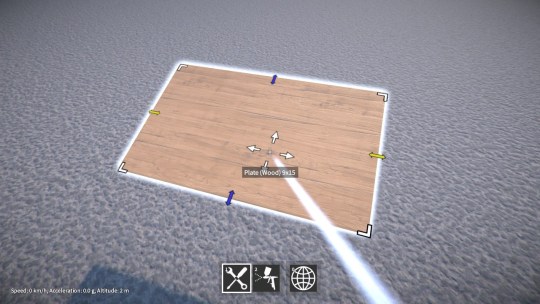
One of the main problems with the current resizing controls is that they’re non-obvious, particularly to new players, because there’s nothing showing them what to do. As a first step towards improving this situation, I’ve now added a resize indicator that shows the available resizing directions (colour coded for the horizontal and vertical directions).
I’m also going to add a new tool UI display that (among other things) will show which keys to use to resize in each direction. Hopefully both of these changes together will make resizing a bit clearer for the player.
Attachment indicators
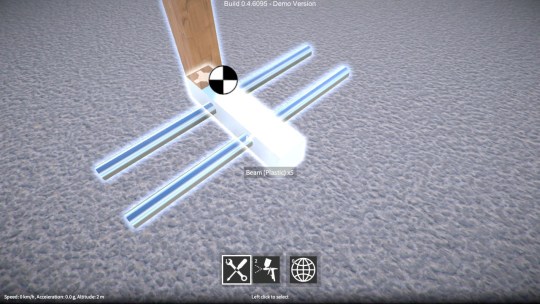
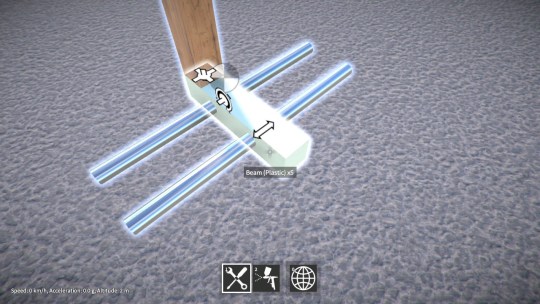
The attachment indicators also suffered from not being very visible a lot of the time, so I modified their textures too, and also tweaked them to ensure visibility from all angles. Here’s an example showing before and after these improvements.
Other improvements
I’ve also worked on several other bits and pieces, for example:-
Next up
I’m fairly happy with how things turned out after the changes I made, yes the construction controls could still be better, but they’re acceptable, and at this point I need to move on to other stuff really. There are one or two more small tweaks and bug fixes to do, but apart from that I’m done with the controls and ready to tackle the next thing.
I want to get another demo build out fairly soon, but I still have a laundry list of small tasks to sort out before I can do that, so those are what I’ll be looking at next!
I’ve been playing around with a translucent PBR shader in GearBlocks over the weekend. It’s “paintable” like other materials except the paint colour is used as a tint. Should work nicely for glass, transparent plastic etc!
Well, 2016 has certainly been, shall we say, an “interesting” year! Perhaps many people will be glad to the see the back of it, but somehow I’ve a feeling 2017 won’t be any less eventful. Anyway, here’s hoping the new year brings good things to you all!
Back in my little GearBlocks corner of the world, in many ways things have progressed pretty well this year, getting through the Unity 5 hurdle was definitely a big step forward. I’m a bit frustrated to not be further ahead with the game generally by now though. I’ll just have to keep chipping away at it, it’ll get there eventually. I’m very appreciative to all those of you who have played the demo, built some amazing creations, and given me really useful feedback. It helps motivate me to keep going!
Over the past couple of months I’ve been working on a bunch of different things. I was looking at improving the construction controls, but kinda got stuck with “designer’s / programmer’s block” if you can call it that. So while thinking on this some more, to keep progress going I did several other smaller tasks:-
Next week I plan on going back to the controls improvements, mustn’t procrastinate any longer!
Something a bit different in this video, just a brief demo of a fun little rendering effect I’ve been messing around with. It doesn’t work properly with all the parts because they don’t all have UVs yet, but other than that I’m pretty happy with it.
It’s been a while since the last update, so I thought I’d do a quick post on what I’ve been up to! A couple of weeks were taken up with travelling back to the UK for a bit, and I was sick all last week which took me out of action unfortunately. I have been working on the game though over the past several weeks…
First person controller
The current first person camera controller in the game is basically a prototype implementation. It’s buggy and missing a lot of features, for example: camera smoothing, crouching, head bob, and so on. My plan was to switch over to the excellent UFPS from Opsive (available on the Unity asset store: http://u3d.as/2Jc) which has all these features and more. Unfortunately that didn’t work out, mainly because I couldn’t bring across only the code I wanted from UFPS (character and camera controller) without either modifying it or also including a lot of other stuff I don’t need (e.g. inventory, weapons, damage etc.)
I think UFPS is great as a starting point for a first person game, but trying to integrate it in at this late stage of a project probably isn’t practical. So now my plan now is to keep what I have and gradually improve it, probably stealing code from UFPS as necessary!
Deprecated networking API
I have a rudimentary networked multiplayer mode for GearBlocks, and in fact even the single player mode runs through the same code paths. I want to keep this working so that I have a good starting point should I wish to revisit multiplayer in the future. Right now I’m using the old Unity networking API, which was causing a bunch of annoying “obsolete API” compiler warnings, because it’s recently been deprecated in favour of their new system, UNET.
I looked into what it would take to upgrade to UNET, using their high level API (HLAPI). Unfortunately there were all sorts of awkward problems with this (like needing to derive from NetworkBehaviour, which didn’t play nicely with my generic singleton implementation for some reason). The whole thing was turning into a massive change that would break the entire game until I completed it. Not to mention it’s still fairly early days for UNET and it’s changing quite a bit as Unity continues to develop it.
Besides, ultimately I might be better off using their low level networking API, but that would obviously take even longer to implement. Or, perhaps using a third party system like Photon Bolt would be a better way to go. I’d need to spend a lot more time on this to figure out the best thing to do, so I’m leaving it for now. Instead, I um…disabled those pesky deprecated API warnings, there you go, job done!
What’s next
So, it’s generally been a frustrating few weeks, hopefully I can get back to being more productive now! I’ve been prototyping something for the game, not sure if it’ll work out yet, but I’ll be continuing with that.
Also, I’m going to work on improving the construction controls, in particular to help new players pick up the game and get started. Well, that’s the plan anyway!
New desert map
At long last, I have done away with the old procedurally generated terrain. I decided that it made more sense to have a few decent “hand crafted” maps in the game, rather than an almost infinite number of crappy ones!
So, now in it’s place there is the new desert map. This is still a work in progress, I have a lot of details still to add to it, but the main thing for now is that it at least has a flat area to build on without stuff rolling away. In the full game I plan on adding other maps based in different settings (e.g. forest, grassland, salt flat, snow / ice, etc. haven’t quite decided yet).
Rendering improvements
Having upgraded to Unity 5 this allowed me to make the switch over to physically based rendering (PBR). Besides making things look pretty, PBR serves a practical purpose in that you can now visually distinguish materials (e.g. metal actually looks like metal now). It also makes it much easier to achieve consistent lighting across the whole scene.
I’ve also upgraded the time-of-day system, and tweaked the post effects too.
Saved game format
The saved game format has changed slightly, so old saved games won’t work in this build. However, saved constructions from the previous build version (0.4.6034) should still load OK. If you have saved constructions from versions earlier than that, I’d recommend loading them in build 0.4.6034, then save them back out, they should then load properly into the new build.